今日笔记
grep
grep是对数据进行过滤查找关键字
源数据可以是
- 文件内容
grep hello /opt/hello.txt,找出存在hello的那一行
- 命令的执行结果 ,这个需要结合管道符使用,
cat /etc/passwd | grep 'root'
 1
 2
 3
 4
 5
 6
 7
 8
 9
10
11
12
13
14
15
16
|
测试数据

I teach linux.

I like python.

My qq is 877348180.

My name is chaoge.

Our school website is http://yuchaoit.cn。

Where is my girl friend.

Who is your boy friend.
My phone number is 15233334444.
|
1.找出存在My字符的行
linux是区分大小写的,注意
-n 参数,显示存在该关键字的行号
grep -n 'root' /etc/passwd
-i grep忽略大小写
grep -i 'root' /etc/passwd ,无论大小写,找出/etc/passwd文件中,包含的root信息
 1
 2
 3
 4
 5
 6
 7
 8
 9
10
11
12
13
14
15
16
17
|
grep '关键字'  文件名


[root@localhost opt]# grep 'My' testgrep.txt
My qq is 877348180.
My name is chaoge.
My phone number is 15233334444.
[root@localhost opt]#
[root@localhost opt]#
[root@localhost opt]#


[root@localhost opt]# grep -n  'My' testgrep.txt
5:My qq is 877348180.
7:My name is chaoge.
14:My phone number is 15233334444.
|
找出小写的my的行
1
2
3
|
[root@localhost opt]# grep -n  'my' testgrep.txt
11:Where is my girl friend.
[root@localhost opt]#
|
比如,搜索系统的一些日志文件,找出关于root相关的信息
1
2
3
|
[root@localhost opt]# grep -n  'root'  /var/log/messages

[root@localhost opt]# grep -n  'root'  /var/log/secure
|
grep不仅能从文件里搜索关键字,只要是文本数据,就可以进行搜索过滤
grep作用是,从文件中(而非文件夹)匹配出存在该关键字的那一行信息。
 1
 2
 3
 4
 5
 6
 7
 8
 9
10
11
12
13
14
15
|
[root@localhost opt]# grep 'apple' ./*
./t1.txt:apple1
./t2.txt:apple2
./t3.txt:apple3
grep: ./北京: Is a directory


[root@localhost opt]# grep 'aoligei'  古诗2.txt
[root@localhost opt]#
[root@localhost opt]#
[root@localhost opt]# grep 'aoligei'  t1.txt
aoligei
[root@localhost opt]#
[root@localhost opt]# grep -n  'aoligei'  t1.txt
7:aoligei
|
greo的忽略大小写参数 -i 结合-n显示行号
 1
 2
 3
 4
 5
 6
 7
 8
 9
10
|
[root@localhost opt]# grep -n -i 'apple' t1.txt t2.txt t3.txt
t1.txt:1:apple1
t1.txt:2:apple1
t1.txt:3:apple1
t1.txt:4:apple1
t1.txt:8:Apple1
t1.txt:9:apple1
t1.txt:10:Apple1
t2.txt:1:apple2
t3.txt:1:apple3
|
利用grep找出nginx软件,配置文件中,定义的网站监听端口号
1
2
|
[root@localhost opt]# grep -n -i 'listen'  /etc/nginx/nginx.conf
39:        listen       80;
|
管道符
管道符,和grep结合的是最多的
1
2
3
|
管道符,在linux中的表达符号是

|     (快捷键shift + \)
|
管道符得标准定义
1
2
3
|
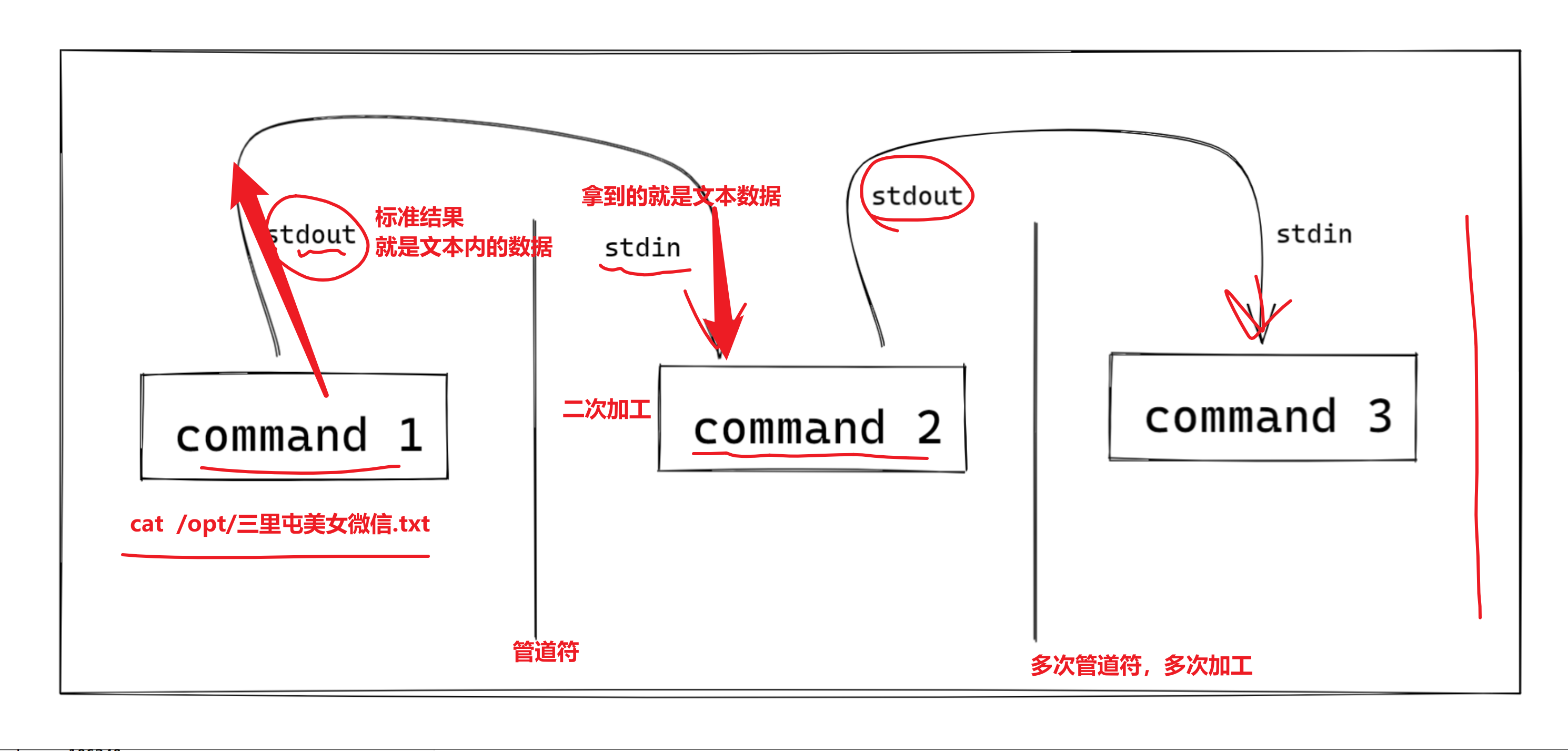
管道是一种通信机制,通常用于进程间的通信。

它表现出来的形式将==前面每一个进程的输出(stdout)直接作为下一个进程的输入(stdin)==。
|
利用grep和管道符,来查看系统用户信息
 1
 2
 3
 4
 5
 6
 7
 8
 9
10
11
12
13
14
15
16
17
18
19
20
21
22
23
24
25
|
1.找出chaoge用户的信息
/etc/passwd 是系统的用户信息存放文件
在这个文件中,是用户通过命令创建的用户,id号是从1000开始的,比如
useradd yejinyang01
添加完之后,就会在这个文件中生成一行信息


关于查找用户是否存在的命令
# grep 'yejingyang' /etc/passwd
[root@localhost opt]#
[root@localhost opt]#
[root@localhost opt]# # 如何查看linux是否存在某用户,如yejingyang
[root@localhost opt]#
[root@localhost opt]#
[root@localhost opt]# id yejingyang
id: yejingyang: no such user

通过grep找到用户,表示该用户存在
[root@localhost opt]# id yejinyang
uid=1001(yejinyang) gid=1001(yejinyang) groups=1001(yejinyang)
[root@localhost opt]#
[root@localhost opt]#
[root@localhost opt]#
[root@localhost opt]# grep 'yejinyang'  /etc/passwd
yejinyang:x:1001:1001::/home/yejinyang:/bin/bash
|
管道符
1
2
3
4
5
6
7
8
|
命令1  | 命令2

命令1,拿到用户文件信息   |  交给grep再去过滤

[root@localhost opt]# cat /etc/passwd |  grep 'yejinyang'
yejinyang:x:1001:1001::/home/yejinyang:/bin/bash
[root@localhost opt]#
[root@localhost opt]# grep 'yejinyang' /etc/passwd
|
管道符常见用法
检查进程
 1
 2
 3
 4
 5
 6
 7
 8
 9
10
11
|
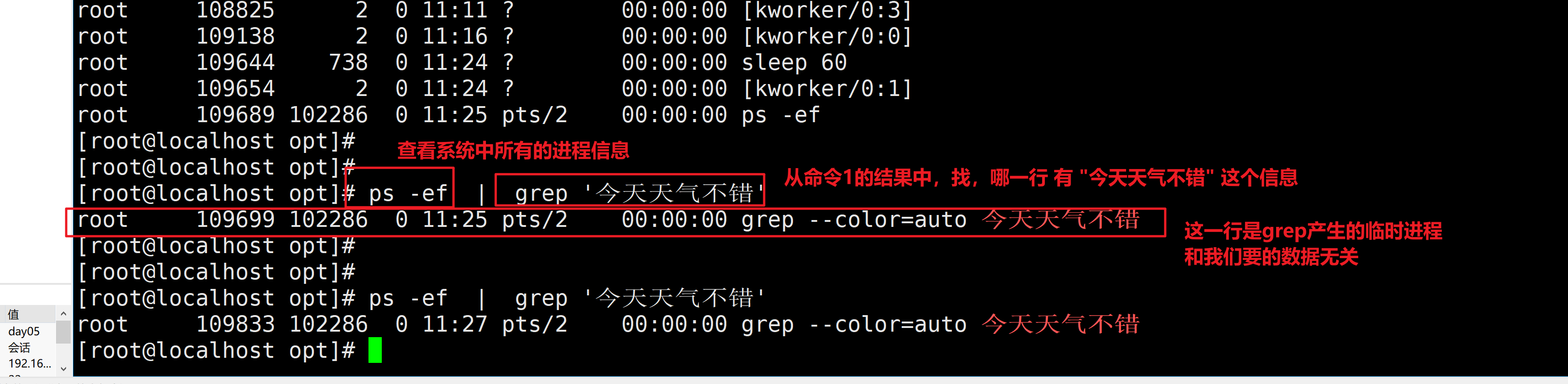
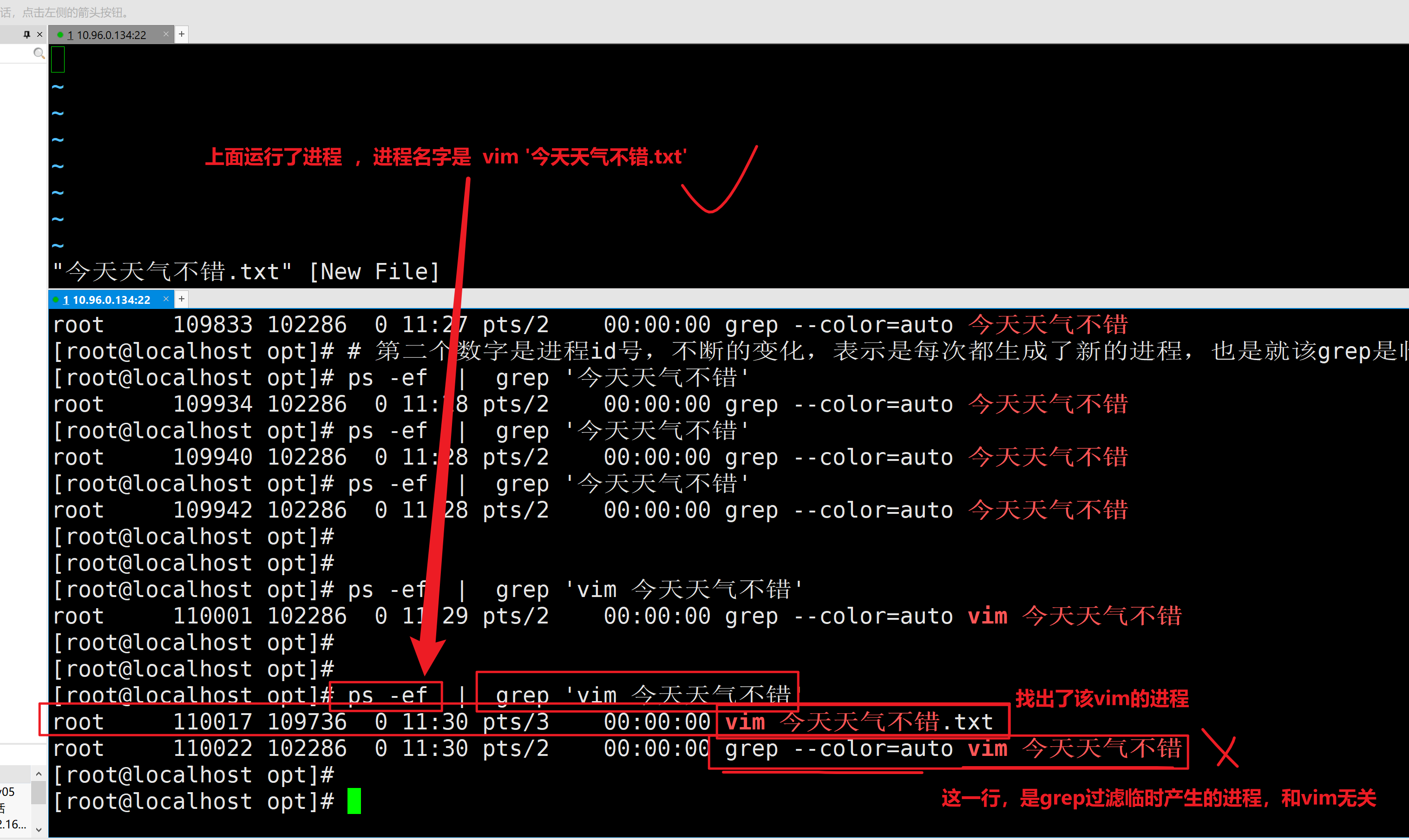
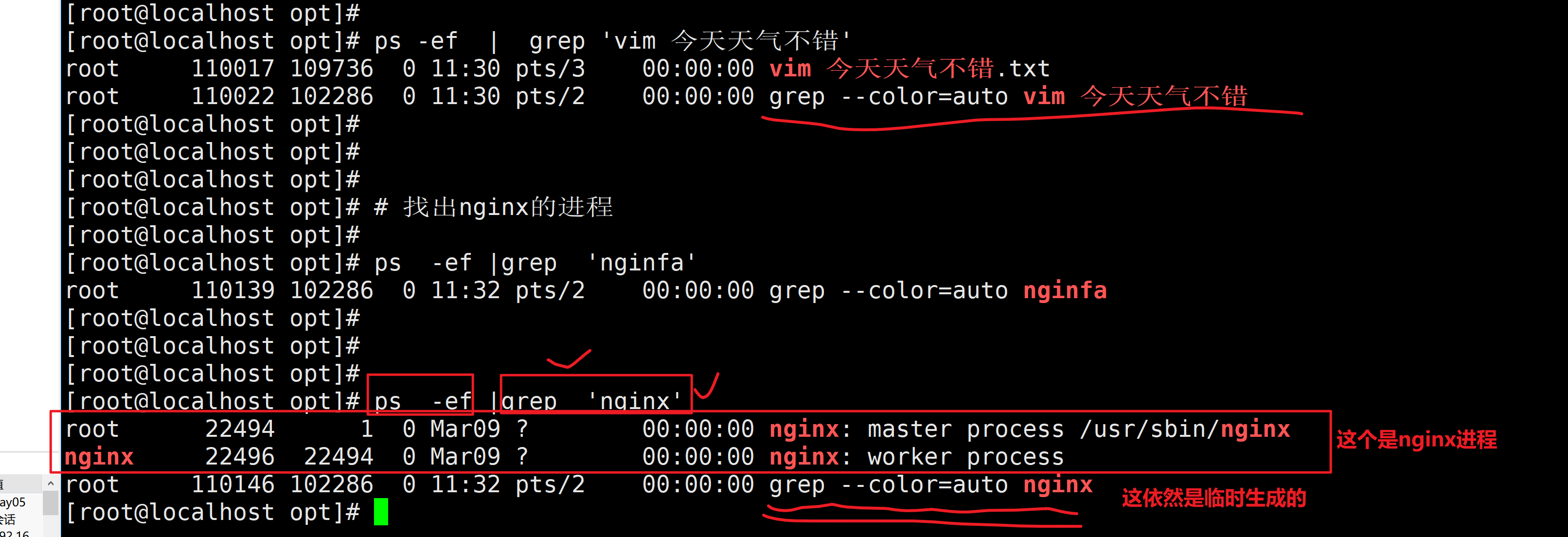
1.查看系统进程信息的命令

ps  -ef  # -e 显示所有的进程信息  -f 格式化显示出进程的id号,等其他信息

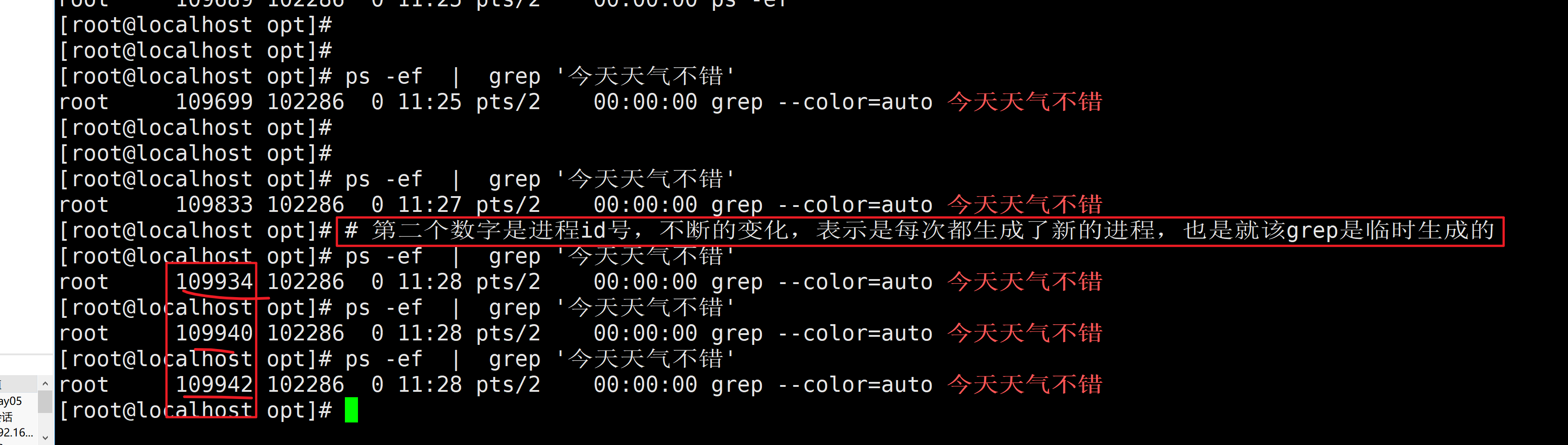
2.上述命令,找到了一堆进程,如何过滤出我们要的信息呢?

学习如何,正确使用 grep 和管道符,去过滤机器上某个进程,判断某个进程是否存在

1.找出vim的进程

2.找出nginx的进程
|
检查端口
1
2
3
4
5
6
7
8
|
1.需要学习,检查系统端口的命令,这个命令,和ps -ef  一样,是查看系统某资源信息
netstat -tunlp   # 这个组合参数,是查看系统上,所有的端口信息

2. 过滤出,机器上,和ssh远程连接的端口信息,提示程序名叫ssdh,或者端口号是22

结合查看端口的命令+ 管道符+ grep,实现,高效的过滤

netstat -tunlp   | grep  'nginx'
|
统计文件数量
1
2
3
|
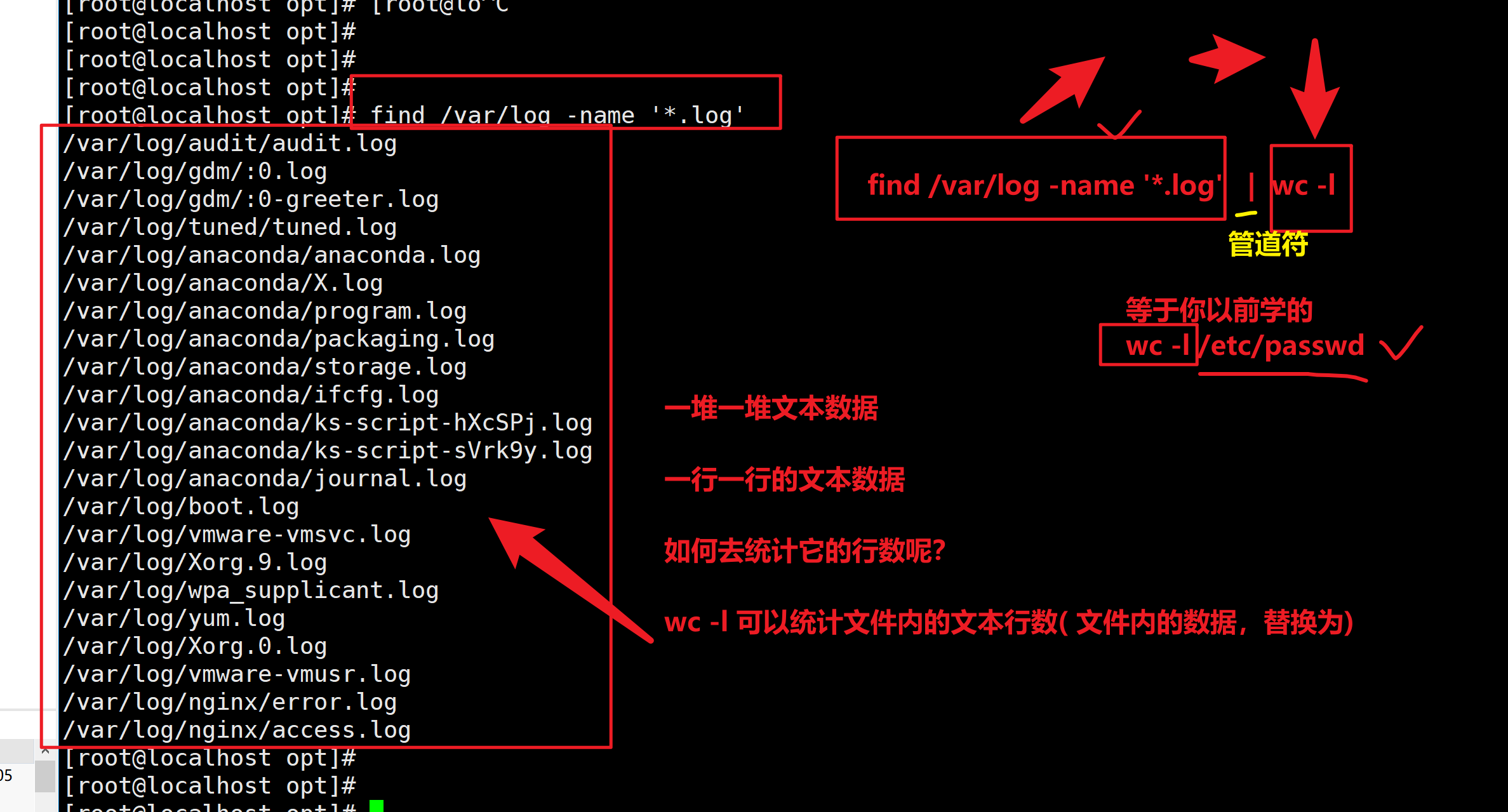
# 1.统计系统中/var/log目录下有多少个log文件
1.先找出/var/log下所有的log文件,find是递归搜索,找出所有的log后缀文件,不放过一个
find /var/log -name '*.log' | wc -l
|
统计系统用户数量
1
2
3
|
/etc/passwd

cat /etc/passwd |  wc -l
|
管道符,结合find命令搜索信息
1
2
3
4
5
6
7
8
|
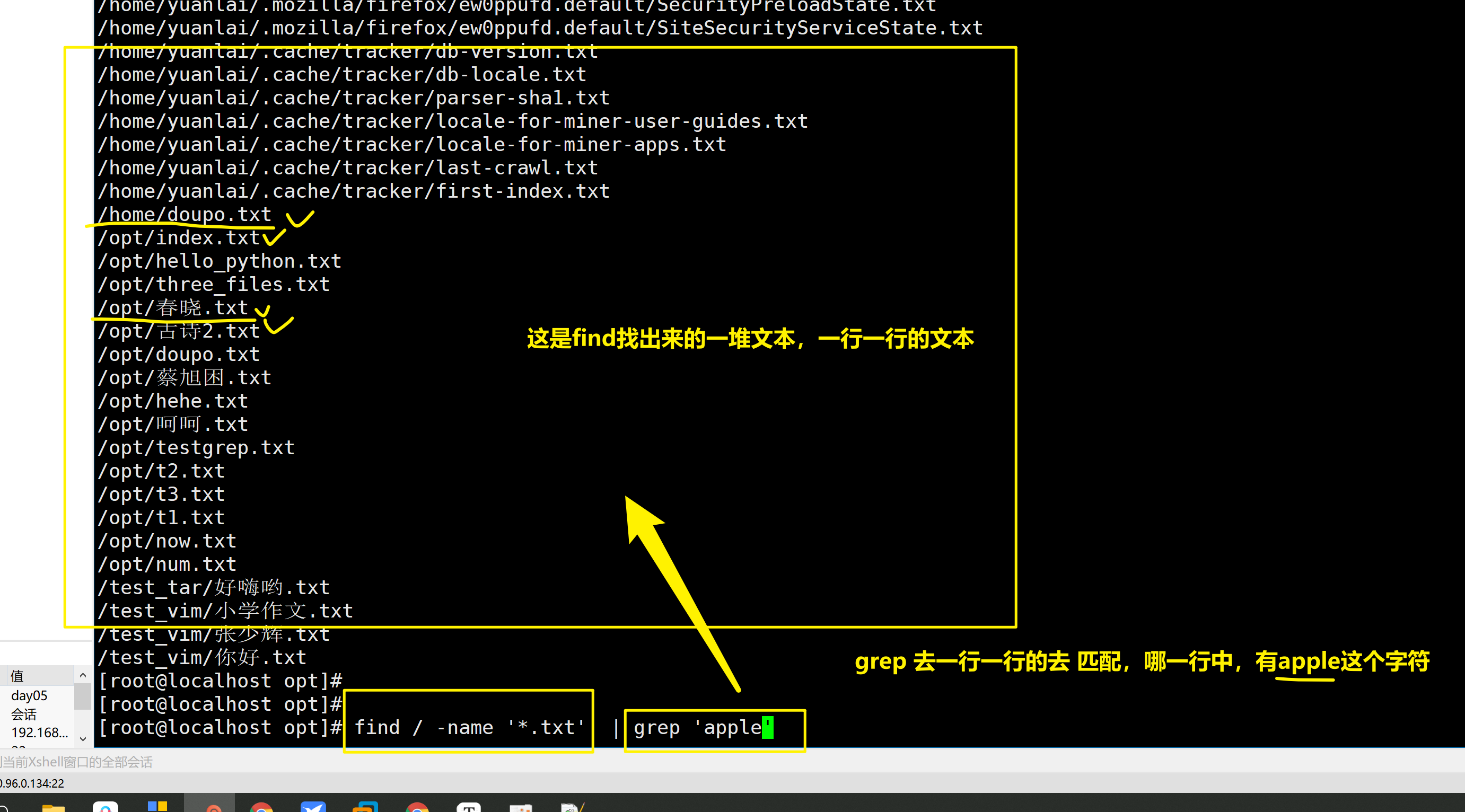
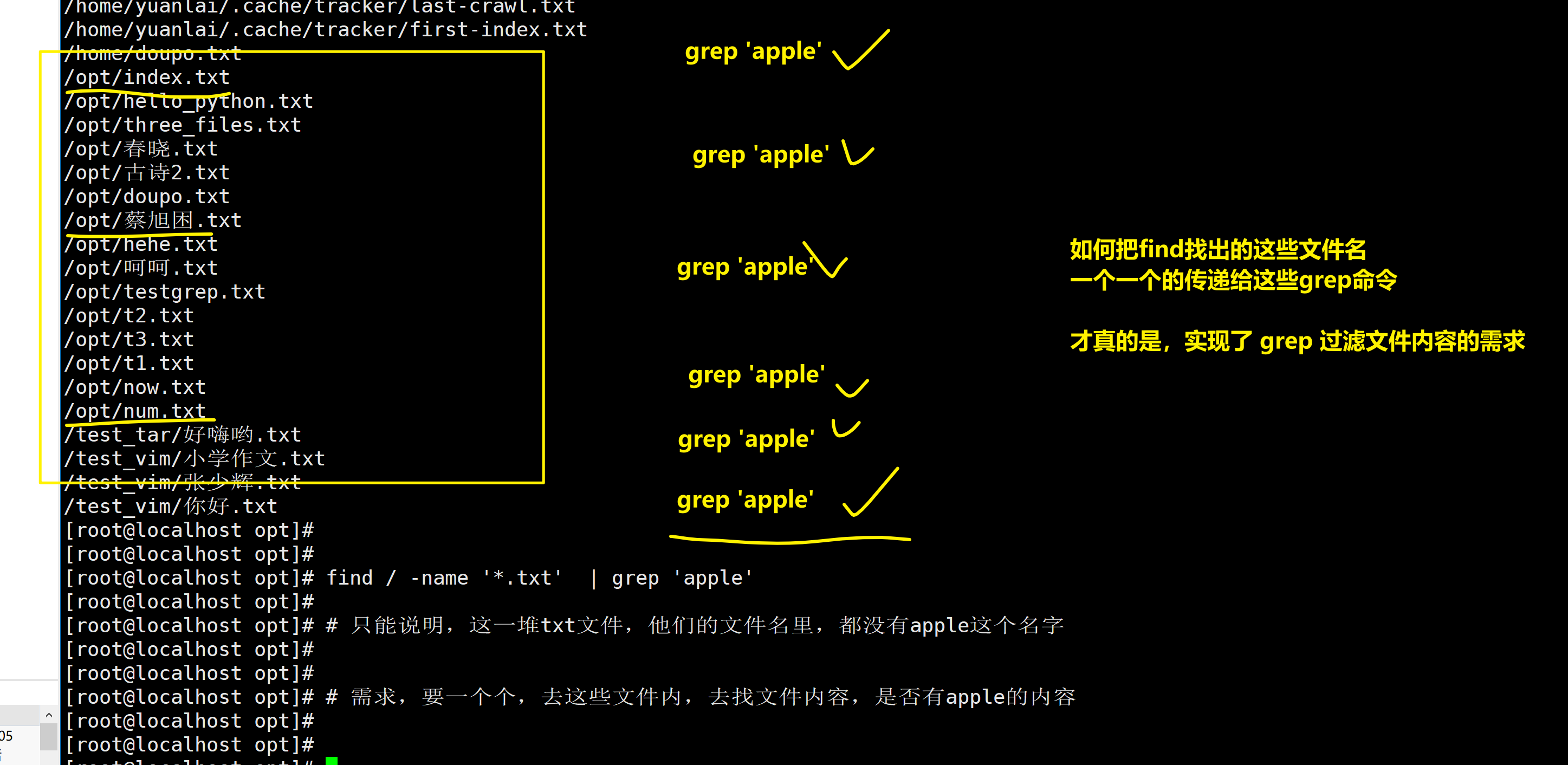
1.找出系统中所有的txt文件,然后再过滤出,其中包含了apple信息的txt是哪些


1.
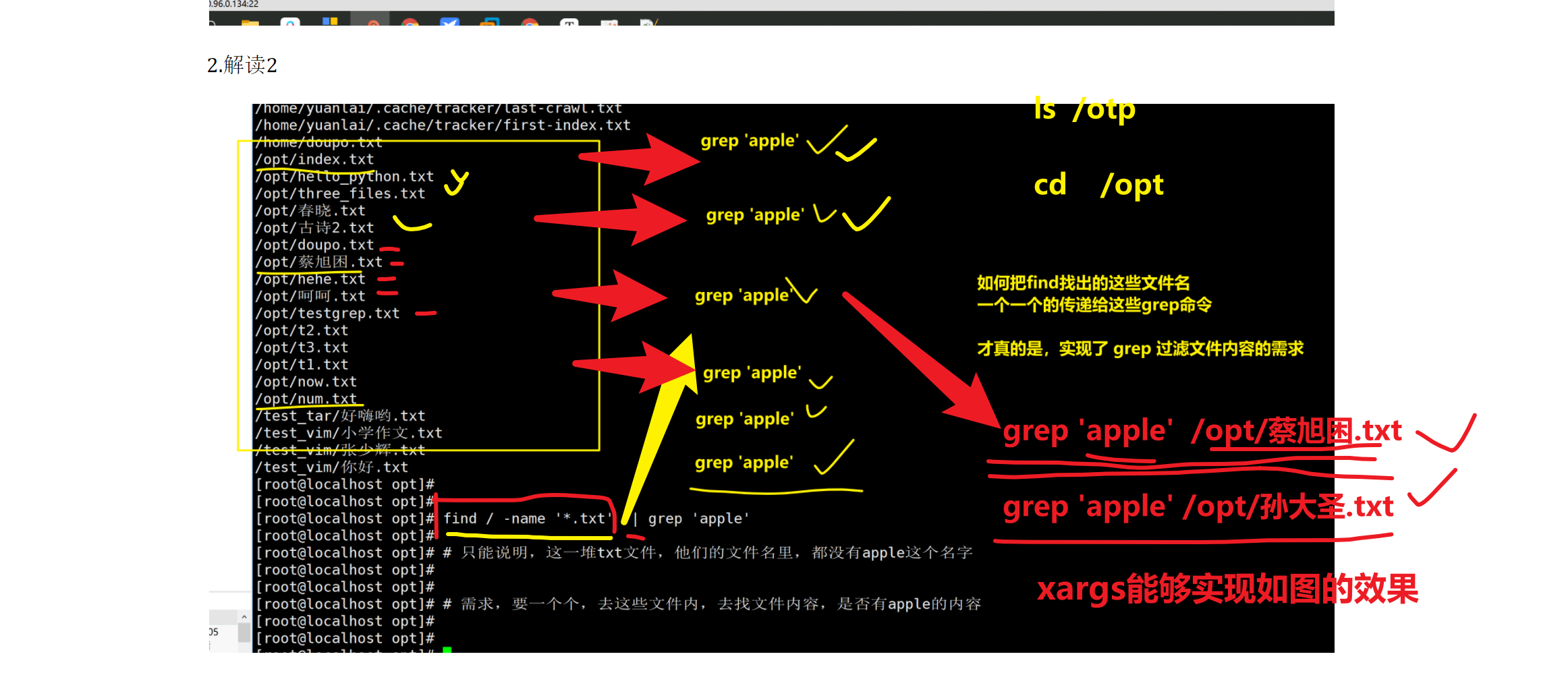
find / -name '*.txt'  # 这个命令找出的,每一个txt文件的名字吧,并且就是,一堆,一行一行的文本而已

2.我要判断出,这些文件,哪一个是包含了apple字符串内容的
一个个的去grep这些文件才行!!!
|
1.解读1
2.解读2
需求
1.找出系统上所有的txt文本
2.判断哪些文件中是包含了apple文本行的
grep -l 显示匹配到数据的的文件名
这道题,需要用到grep+管道符+xargs理解。
xargs
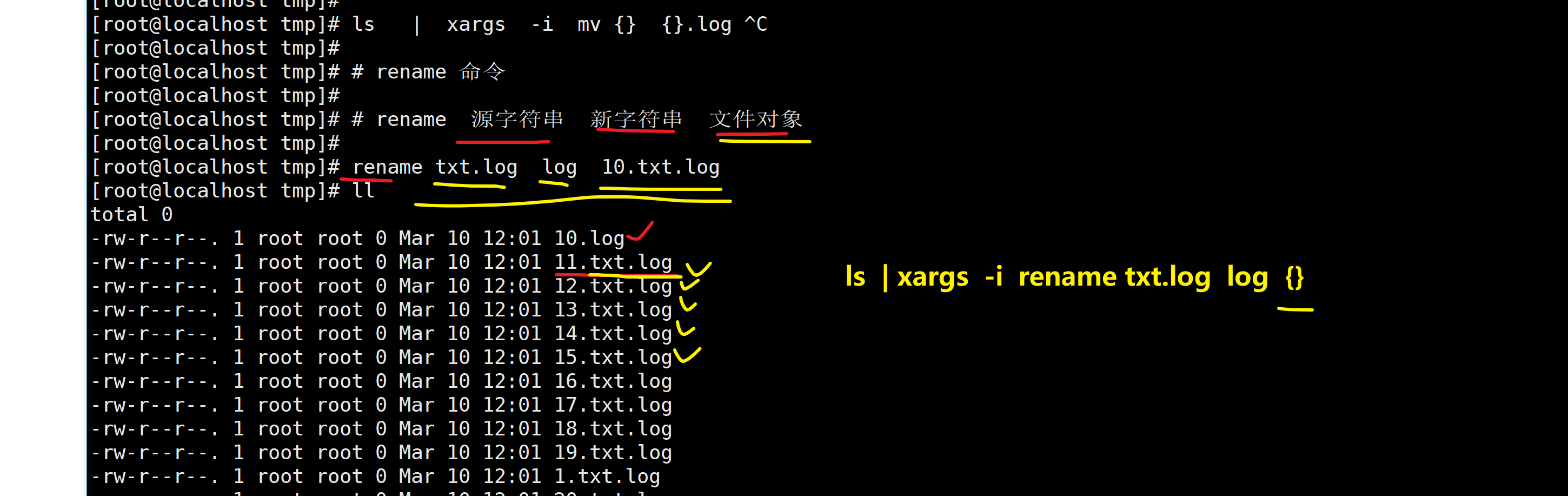
作用是,简单的说 就是把其他命令的给它的数据,传递给它后面的命令作为参数
先抛出需求
语法如下
1
2
3
4
5
|
命令1 | xargs 选项

选项

-i 用 {} 代替传递的数据
|
xargs实现批量备份

xargs实现批量重命名
全系统中搜索,包含某数据的文件名
1
2
|
[root@localhost tmp]# find /  -type f  -name '*.txt' | xargs  -i grep -l 'xiake' {}
/var/log/nginx/mima.txt
|
下午补充 find其他用法